
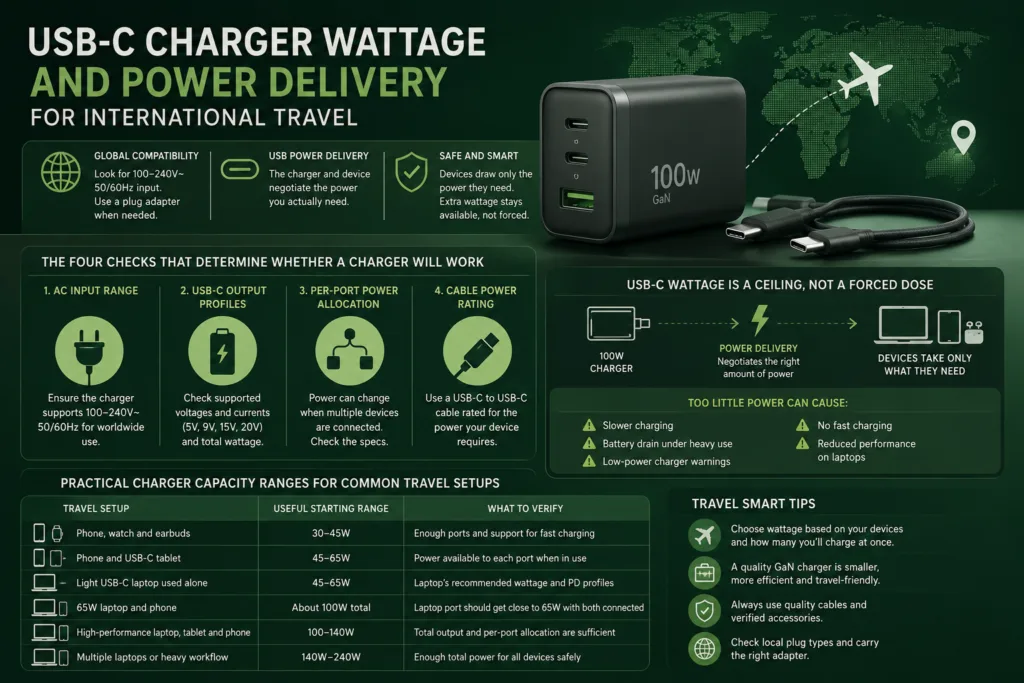
For international travel, choose USB-C charger wattage according to your devices and the number you want to charge at once—not according to the destination’s wall voltage. A charger that accepts 100–240V AC at 50/60Hz can normally operate on both lower-voltage and higher-voltage power systems. You may still need a plug adapter to fit the local outlet.
The complete charging chain must be compatible: the charger must offer the required USB Power Delivery profile, the selected port must provide enough wattage, the cable must carry that power, and the device must support the same charging method. A large watt number printed on the charger does not guarantee that every port or device receives that amount.
The four checks that determine whether a charger will work
1. AC input range
This determines whether the charger can safely accept the destination’s electricity. Look on the charger for wording such as:
Input: 100–240V~ 50/60Hz
If that complete range is shown, a voltage converter is normally unnecessary for the charger itself.
2. USB-C output profiles
This determines what the charger can deliver to a connected device. The label may list several combinations, such as 5V, 9V, 15V or 20V with different current limits.
The highest advertised wattage matters only when the charger, cable and device support a compatible profile.
3. Per-port power allocation
A multi-port charger may provide its full rating only when one particular USB-C port is used alone. Connecting a second device can reduce the laptop port from 100W to 65W, for example, depending on the charger’s documented allocation.
4. Cable power rating
The cable can limit charging even when the charger has enough capacity. For laptop-class charging above 60W, use a USB-C to USB-C cable explicitly rated for the required power.
USB-C wattage is a ceiling, not a forced dose
A 100W USB-C charger does not continuously push 100W into every connected device. Under USB Power Delivery, the charger advertises the power options it can provide and the device requests an option it supports. A phone that needs far less power takes only the negotiated amount, while a compatible laptop may request a much higher profile. USB Power Delivery supports power levels up to 240W over suitable USB-C equipment.
This is why using a properly designed 65W or 100W PD charger with a lower-power phone is normally acceptable. The extra capacity remains available rather than being forced into the phone.
More charger wattage does not make every device charge faster. The device controls how much compatible power it requests. A phone limited to 27W will not become a 100W-charging phone when connected to a 100W charger.
The reverse situation causes more trouble. A charger below the device’s normal requirement may:
- charge the device more slowly;
- maintain the battery level without charging it quickly;
- allow the battery to drain during gaming, rendering or other heavy use;
- trigger a low-power charger warning on a laptop;
- leave performance-limited laptops unable to operate at their normal power level.
Low wattage does not always mean complete incompatibility. A 65W laptop may accept power from a 30W PD charger while asleep, yet lose battery while being used. Whether this is acceptable depends on how the device handles reduced-power sources.
How much USB-C charger wattage should you take?
The original charger or the device manufacturer’s specifications provide the best starting point. Match that requirement first, then add capacity for devices that will charge at the same time.
| Travel setup | Useful starting range | What to verify |
|---|---|---|
| Phone, watch and earbuds | 30–45W | Enough ports and support for the phone’s preferred fast-charging method |
| Phone and USB-C tablet | 45–65W | Power available to each port when both are connected |
| Light USB-C laptop used alone | 45–65W | The laptop’s recommended wattage and supported PD profiles |
| 65W laptop and phone | About 100W total | The laptop port must still receive close to 65W during two-port use |
| 100W laptop and smaller devices | 140W or more | At least 100W must remain available to the laptop port during simultaneous charging |
| Laptop requiring more than 100W | Match the manufacturer’s rating | EPR support, cable rating and any manufacturer-specific charging requirement |
These ranges are packing estimates rather than universal device requirements. A compact laptop may run normally from 45W, while another model with the same USB-C connector may expect 100W or more. Gaming and workstation laptops may also use USB-C only for reduced-power charging while retaining a separate high-power adapter for full performance.
Why a charger’s total wattage can be misleading
On a multi-port charger, three different ratings may appear:
- Maximum total output: the combined limit for the charger.
- Maximum single-port output: the most one port can provide when used alone.
- Simultaneous port allocation: how power is divided when two or more ports are active.
Suppose a charger is advertised as 100W. Its primary USB-C port might provide 100W by itself, but the documented two-port mode might allocate 65W to the first port and the remaining capacity to the second. That arrangement can be suitable for a 65W laptop and a phone, but it is not equivalent to a dedicated 100W laptop charger while both ports are occupied.
Before selecting a travel charger, look for an allocation table covering the exact ports you intend to use. Marketing phrases such as “100W total” or “200W charger” do not reveal whether a particular USB-C port retains enough power during simultaneous charging.
Check the port names as well as the numbers. USB-C1 may support the charger’s highest output while USB-C2 is limited to a lower level. Connecting the laptop to the wrong port can produce slow charging even when the charger has enough total capacity.
Some chargers briefly interrupt charging when a device is connected or removed because they recalculate the power split. This is commonly a short renegotiation rather than a fault. Devices that must remain continuously powered should be tested with the intended charger before the trip.
The cable must match the charger and device
Current USB-IF cable markings distinguish USB-C to USB-C cables by power capability, including 60W and 240W labels. The power marking tells you what the cable can carry; it does not raise the charger’s output or the device’s charging limit.
For charging at 60W or below
A properly rated 60W USB-C to USB-C cable is normally enough when the device does not request more than 60W. This covers many phones, tablets, handheld devices and lower-power laptops.
For charging above 60W
Use a cable rated for the intended higher-power operation. Newer 240W-rated cables are designed for Extended Power Range charging and can also be used with lower-power devices. Older 100W-rated 5A cables remain in circulation and may be suitable for compatible charging up to their marked limit, but they are not substitutes for a 240W cable when an EPR device requires more than 100W.
A higher-rated cable is safe to use with a lower-powered charger because the actual output is still negotiated. A 240W cable connected to a 30W charger remains a 30W charging setup.
Power rating and data speed are separate
A cable capable of high charging wattage is not automatically a high-speed data, display or docking cable. USB-IF treats cable power capability and supported data rate as separate markings. Select for both properties when the same cable will connect a laptop to a monitor, dock or external drive.
For laptop-class USB Power Delivery, use USB-C to USB-C unless the device manufacturer states otherwise. A USB-A port or USB-A to USB-C cable will commonly provide lower-power charging through a different charging method and should not be treated as a replacement for a high-wattage USB-C PD connection.
Power Delivery support matters as much as wattage
Two chargers with the same advertised wattage can behave differently because they may support different voltage profiles or charging features. Check for USB Power Delivery rather than relying on the USB-C connector alone.
USB-C describes the connector. It does not, by itself, promise a particular charging speed. A USB-C port may provide basic charging, standard PD charging, higher-power Extended Power Range charging or a manufacturer-specific mode.
PPS and phone fast charging
Some phones use Programmable Power Supply, commonly shown as PPS, to obtain their preferred fast-charging speed. A standard PD charger without the required PPS range may still charge the phone, but the phone can fall back to a slower mode.
Check these details when phone charging speed matters:
- whether the charger lists PD and PPS;
- the PPS voltage and current ranges;
- whether the selected USB-C port supports PPS;
- whether PPS remains available when other ports are used;
- the cable type required by the phone.
Manufacturer-specific laptop charging
Some laptops accept standard USB PD only up to a certain level and use a manufacturer-specific charger for higher output. Others can charge through USB-C but cannot maintain full performance from a smaller third-party charger.
For a laptop that normally ships with a 130W, 140W, 180W or larger adapter, do not assume that any charger carrying the same watt number will be equivalent. Confirm the supported USB-C input power, required PD or EPR profiles and whether full performance is available without the original adapter.
International voltage compatibility is a separate check
USB-C output wattage describes the DC power delivered to the device. International compatibility begins on the opposite side of the charger, where wall electricity enters.
Inspect the charger body or its detachable AC module for the word Input. A label similar to the following normally indicates wide-range operation:
Input: 100–240V~ 50/60Hz
The charger can accept mains power across that complete range. Use a suitable plug adapter when the destination outlet shape differs.
Major USB-C power adapters commonly use this wide input range, but it must be checked on the exact charger being packed. Apple, for example, states that its USB power adapters are designed for 100–240V AC at 50–60Hz, while Dell lists the same broad input range for many modern laptop adapters.
If the label shows only a narrow range such as 100–120V or 220–240V, do not connect it to an incompatible supply without a properly selected voltage-conversion solution. Confirm the requirement with the manufacturer rather than relying on the plug shape.
A plug adapter does not change voltage
A plug adapter changes the physical connection so your charger can fit the destination outlet. It does not turn 230V into 120V, increase USB-C wattage or add Power Delivery support.
For a universal-input USB-C charger, that is usually sufficient: the charger handles the voltage and the plug adapter handles the outlet shape. A separate voltage converter is generally unnecessary for that charger.
High-output chargers may have input-dependent limits
Some very high-wattage multi-port chargers provide a lower combined output when connected to 100–120V mains than when connected to 220–240V mains. This is product-specific. Check the charger’s manual or allocation diagram when you need its maximum advertised output in every country.
The phrase “100–240V input” confirms that the charger can operate across the range. It does not always promise identical maximum multi-port output at every input voltage.
Do not confuse an AC travel adapter rating with USB-C output
A universal travel adapter may display an AC rating such as 10A, 13A, 2,300W or 2,500W. That rating applies to the pass-through AC outlet under specified conditions. It does not tell you the power available from the built-in USB-C port.
For the built-in USB-C charger, look for a separate output specification such as:
- USB-C PD maximum wattage;
- supported voltage and current profiles;
- PPS support;
- single-port output;
- output when several USB ports are active.
An adapter with a high AC pass-through rating may still contain a 15W or 20W USB section. Conversely, a dedicated 65W or 100W USB-C charger connected through a suitable plug adapter may provide much more useful laptop charging.
Use travel adapters from traceable manufacturers with appropriate safety compliance for the markets where they are sold. Government product-safety databases continue to report poorly constructed universal adapters presenting electric-shock risks.
A practical way to size one charger for several devices
Start with the most demanding device and work downward.
- Find the laptop’s normal input requirement. Use the original adapter rating or the manufacturer’s USB-C charging specification.
- Decide which devices must charge simultaneously. Do not add devices that can comfortably charge overnight one at a time.
- Check the charger’s simultaneous allocation. Confirm how much remains on the laptop port when the phone, tablet or watch is connected.
- Match the highest-power cable. The laptop cable should support the full output allocated to that port.
- Confirm charging protocols. Look for PD, EPR or PPS where required rather than comparing wattage alone.
Example: a 65W laptop and a phone
A 100W multi-port charger can be a suitable choice when its two-port mode reserves about 65W for the laptop and provides the remaining capacity through another port. A 100W model that drops the main port below the laptop’s useful operating requirement may be less suitable despite having the same headline rating.
Example: a 100W laptop and a phone
Look for a charger above 100W whose documented multi-port mode still allocates 100W to the laptop port. A 100W charger cannot supply a full 100W to the laptop and also provide additional power to another device at the same time.
Example: phone, tablet and accessories without a laptop
A 45W or 65W charger may be more practical than a larger laptop charger. Port count and charging protocol support can matter more than maximum wattage when each device has a modest power requirement.
Why charging can still be slow with a high-wattage charger
When a device charges more slowly than expected, check the charging chain in this order:
- The device may not support the charger’s fastest protocol.
- The cable may be limited to a lower current or wattage.
- The device may be connected to a lower-powered port.
- Using another port may have changed the charger’s power allocation.
- The device may reduce charging speed because of temperature or battery level.
- A dock, hub or monitor may retain part of the available power.
- The charger may offer less total output at the local mains voltage.
- The device may require a manufacturer-specific charger for its highest mode.
Do not judge compatibility from the connector fit alone. A cable can connect successfully while carrying less power than the charger and device support.
Pre-trip charging check
- Read the charger’s AC input label and confirm that it covers the destination voltage and frequency.
- Pack the correct plug adapter for the destination’s outlet type.
- Check the highest wattage available from the exact USB-C port you will use.
- Review the power allocation for two-port and three-port operation.
- Confirm PD, PPS or EPR support where your devices require it.
- Use a USB-C cable rated for the full laptop charging wattage.
- Test the charger with all intended devices connected at the same time.
- Verify that the laptop gains battery during the heaviest workload you expect while travelling.
- Keep the original high-power adapter available when full laptop performance is essential and third-party compatibility is uncertain.
A well-matched international setup does not depend on the largest watt number available. It depends on a universal AC input, the correct destination plug, enough power on the selected port, compatible USB Power Delivery profiles and a cable that can carry the negotiated output.